Lidnight · a macOS menu bar app for AI agents

Close the lid.
Your agents keep working.
It sleeps when they're done.

Even on battery, your MacBook keeps running Claude Code, Codex and local models with the lid closed. The screen goes dark, and when the work is done your Mac goes back to sleep on its own.

macOS 13+ · Apple Silicon & Intel 7-day Pro trial

Works with

  • Claude Code
  • Codex
  • Gemini CLI
  • Ollama
  • LM Studio
  • MLX

How it works

Start it, close it, forget it

  1. 01

    Run your agents

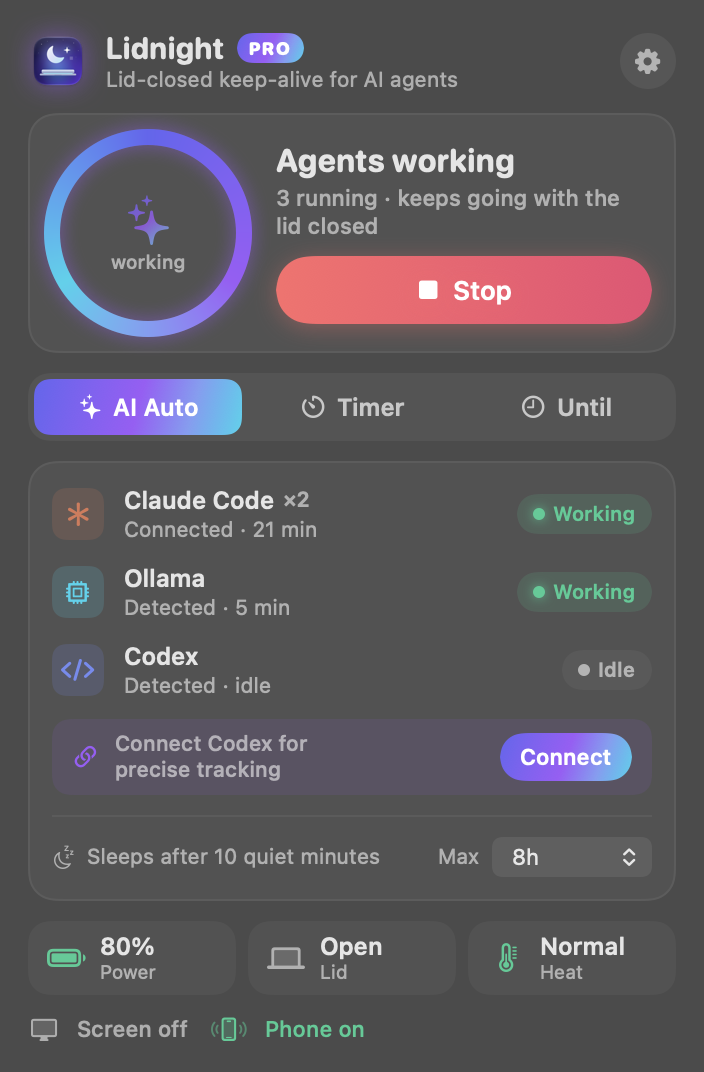
    Start Claude Code, Codex or a local model as usual. Auto mode notices the work begin.

  2. 02

    Close the lid

    The screen turns off, the Mac keeps working — on battery too. It locks the moment you close it.

  3. 03

    Sleeps when done

    Once everything goes quiet, it pings your phone and puts the Mac back to sleep.

Features

Awake exactly as long as it needs to be

When in doubt it stays awake; when the work is clearly done it sleeps. Not interrupting your run comes first.

Auto mode PRO

Knows on its own when work starts and when it ends.

  • Claude Code and Codex: exact start/stop via hooks
  • Local models (Ollama, LM Studio, MLX) by GPU usage; Gemini CLI by process activity
  • All quiet for 10 minutes → notify, then sleep. Hard time cap included

Phone alerts PRO

Delivered via the ntfy app. No account — just scan a QR code.

  • Which task finished: "✅ Claude Code done · my-app · 23 min"
  • Battery and heat warnings before anything stops
  • Check status, start, extend 1 hour or sleep now — from the alert or a remote page

Manual mode

From 30 minutes to 24 hours, until a set time, or unlimited.

Agents can switch it on

lidnight start, lidnight:// links, or ⌥⌘L. Ask your agent to run it before long jobs.

Safety

Stops at a battery floor, warns and sleeps if it overheats in a bag, one-click 80% charge limit. Power settings restore themselves even if the app is force-quit.

Full performance · Fan boost PRO

Turns off Low Power Mode and spins fans up early — Breeze, Gale or Max — before heat builds. Fans return to macOS control whenever the app quits.
Permissions & privacy

You enter your admin password once, to install a tiny helper that can change only specific power settings. Remove it from the app anytime. Your code and conversations never leave your Mac.

Pricing

Pay once. Keep it.

No subscription. Start free, upgrade when you need it.

Free

$0

For a quick step away

  • Manual mode · up to 1 hour per run
  • Battery & heat protection
  • Locks when the lid closes
Download free

Pro Launch price

$4.99one-time

3 Macs · lifetime 1.x updates

  • Auto mode · turns on by itself when AI work starts
  • Unlimited · run until a set time
  • Per-task phone alerts · remote control · work reports
  • Full performance (Low Power Mode off) · Fan boost
  • 7- and 30-day history (tasks & time per project)
Buy Pro $4.99

Everything in Free, included

Every download includes a 7-day free Pro trial. No payment details needed.

FAQ

Questions

Will macOS warn about an unidentified developer?

The current build is awaiting Apple notarization, so the first time you open it, right-click Lidnight in Applications and choose “Open”. Notarized builds will open normally.

Why does it need my admin password?

Keeping a Mac awake with the lid closed requires a power setting that only an administrator can change. Enter your password once and a tiny helper is installed that can change only those specific power settings — nothing else. You can remove it from the app's settings anytime.

Can I put it in my bag? What about heat?

It stops and goes back to sleep if it detects overheating, but don't leave a working Mac somewhere without airflow, like a bag or under a blanket. Keep it closed on a hard, ventilated surface.

Which agents are supported?

Claude Code and Codex are detected precisely through hooks. Gemini CLI is detected by process activity (CPU and network), and local models such as Ollama, LM Studio and MLX by GPU usage. Any other tool works with manual mode.

Can I get a refund?

Yes. Email us within 14 days of purchase for a full refund, no questions asked.

Which Macs does it run on?

macOS 13 Ventura or later, on both Apple Silicon and Intel MacBooks. One Pro license covers up to 3 Macs.

Tonight, close the lid and walk away.